|
Yes - dnc4U works 100% on Windows
8!
Moreover, unlike Vista & Win7, Windows 8 works
straight out of the box under "normal" purchasing
situations. By "normal" we mean an end user
goes to the shop and buys a computer/laptop, goes home
and takes it straight out of the box and installs the
software - no IT staff have been involved and messed
about with user privelidge settings! We think that Windows
8 is a vast improvement over Vista and especially Windows
7 - OK the Metro interface takes some getting used to,
but once you click on desktop, it works just like before
only better. (Do not confuse Windows 8 for desktops/laptops
with Windows 8 for tablets or phones, dnc4U will not
work on tablets or phones)

Here's a quick guide to installation
The first thing to do is download the dnc4U installation
file. Get this by clicking Free Trial on the dnc4U webpage.
Then you need to decide whether to download the version
that does not have an internet connection, or the version
that does have an internet connection and performs a
licence check for days used is via our server. We do
not store any information other than your software code,
your start and end dates, it is totally anonymous. The
second method is preferable because it is more reliable
at giving the full 60 day trial - the non internet connected
version can sometimes fail, especially if you accidentally
turn back the clock. The second version is also superior
for registration, as this is all done automatically.

After making a decision which version you need, you
have the option to download either as a zip or an exe
file. We suggest you save the file rather than run it
- but it's up to you. The zip is simply the exe file
already zipped up, but sometimes your Windows settings,
firewall or antivirus may not like downloading raw exe
files. It depends what make of browser you have, but
all will download the file and place it into a download
folder. We use Firefox, and once downloaded, it performs
virus check and then in the top right hand corner a
large down arrow flashes, by clicking the arrow you
will open up where it is located. Either open up the
exe or open up the zip file.

If you have downloaded the zip, then open it up, and
drag and drop the exe file inside onto your desktop
(or alternate location it is up to you)

Drag and drop the exe file onto your desktop. At least
on the desktop, it is easier to remember where you copied
it to.

You then need to install the setup program with full
admin rights. Like above, in most cases. you will have
these rights. However, we would suggest that you right
mouse click the setup file, and select run-as-administrator
just to make sure. If you are using an anti-virus program
such as Avast that runs any new exe in a sand-box, then
you may get an initial setup fail. Simply let the sand-box
run it's course, then when it has finished, click continue
execution, the setup will continue without problem.
After install you will get a pop-up just reminding you
that running dnc4U as-administrator is recomended.

The installation program will then take it's course
and install the dnc4U program. We have opted to set
the default program folder location for Vista, Win7
& Win8 to the users\public folder. This solves all
kinds of problems with different user's access to the
program, and read/write access of temporary files that
dnc4U creates. Unless you have an overriding reason
not to, we would suggest you stick with this.

Out of the box settings for dnc4U and Windows 8 work
just fine, and running in Windows 8 compatability mode
is great, unlike in previous Windows versions where
you may have had to set compatability to XP SP2. You
can always run the compatability troubleshooter.

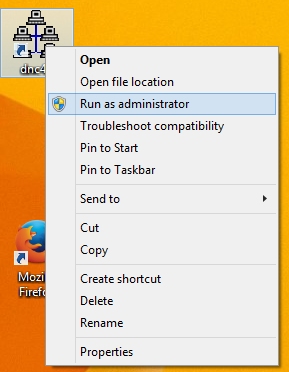
Once dnc4U has been installed, then like above, out
of the box, with no IT department intervention altering
privelidges, dnc4U will work straight away. We would
however recommend that you run-as-administrator, just
to make sure that you have sufficient level of access.
You only need to do this once, and Windows will remember.
On new laptops, it is almost inevitable that you will
not have a com port, in which case you will have to
install either a USB to RS232 adaptor or an express
RS232 card. If you are using a USB adaptor, then we
recommend a keyspan. >> Click
Here or Here
Plug in your keyspan and Windows will go and install
the latest drivers automatically, as keyspan are still
one of the few vendors that have tested Win8 drivers.

Ten minutes later and dnc4U is installed along with
the USB to RS232 adaptor!

In conclusion, installing dnc4U on Windows 8
is very easy, and should not take more than 10 minutes
to download, install and update any USB drivers. What
we can say with almost 100% certainty is that should
you have any problems with the installation, it is amost
certainly a problem with user access permissions. What
often happens is that an IT department will not give
users sufficient access, they may only give them a standard
account which in many cases is not enough. The best
workaround is to run-as-administrator which will temporarily
elevate user permissions just for this program, it will
not give users admin permissions to run amok and mess
up the computer. For IT departments who do not fully understand this, it is good to google "run as administrator"
to put your mind at rest. Maybe Microsoft should have
given this option a more apt name such as "run-this-program-with-elevated-access-so-that-it-works-in-Windows-just-like-it-ought-to"
not as snappy, but more accurate!
|


