| KEYFILE
LICENCE DOES NOT REGISTER |
 |
| The
paragraph below is general info for all Windows Users. |
|
| After you
have made a purchase, you will have received an e-mail with a hyperlink.
You click this link and it downloads your zipped-up licence to your computer.
Inside the zip is the licence file, it is called "keyfile.inf".
If you have followed the detailed instructions on the download page and
unzipped the keyfile into the dnc4U home folder, and it still looks to you
like the keyfile has not registered your software, this is for your information. |
|
| You unzipped
the keyfile into the dnc4U folder, and it still says either XX days left,
or it has expired and it says 0 days left. |
|
 |
|
| Reasons
it could show 0 days left. |
|
| You have made
a typo, and you have not got the correct code. It's easily done, and it
happens quite often. Click Register Software on the top menu bar. You will
see this screen. (The code shown is ours - yours will be different) |
|
 |
|
| If a typo
is not the problem and the number is correct, then click the Unlock Folder
button on this screen. This will show you where you should have unzipped
the keyfile. After you click this it will pop-up this info. When you click
OK, it will open up the folder for you. Please check that the keyfile is
in that folder. |
|
 |
|
| It often happens
that users install dnc4U in a few folders, just to test it, then forget
where they installed. This method will show you exactly where to put it. |
|
 |
|
| This
next paragraph is primarily intended for Windows Vista, Windows 7 and Windows
8 Users |
|
With the advent
of Vista, Win7 & Win8, Microsoft has commited to making security much
tougher, and as a result, much more difficult to understand the labyrinthine
access and security permissions. This can be a real headache, especially
on corporate networks, where the IT department has been real strict with
users.
One of the issues of this heightened security is that some files downloaded
from the internet may be either blocked or they have insufficient access
for a particular user - what this means is that our keyfile licence can
be detected (because it can be seen to exist) but the information inside
cannot be read, because the user has insufficient access to even read from
it. |
|
| If you have
installed the keyfile, as per our instructions, and you see this on your
screen, where there is no value to the number of days left, then it is because
the current user profile does not have sufficient access to read it. |
|
 |
|
| In the first
instance, you should right mouse click the keyfile from inside the dnc4U
folder, select properties and unblock the file. |
|
 |
|
 |
|
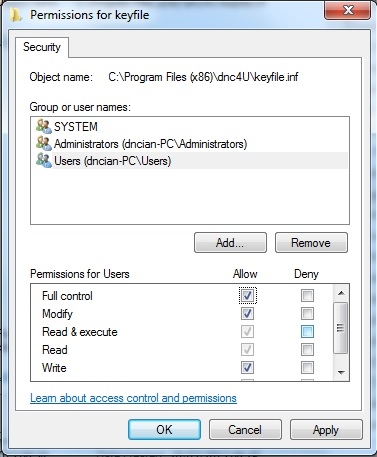
| If unblocking
the file does not work, right mouse click the keyfile from the dnc4U folder
again and click the security tab. By default, the minimum access should
be at least Read and Read & Execute, and in most cases this happens,
and so the keyfile can be read. We have no control over the initial permissions,
it is all down to inheritance on your computer system. Unless there is any
overriding reason not to, we would recommend that you give users full Allow
access to the file. |
|
|
|
|
| If your permissions
show any deny for read, then this is probably the problem. |
|
 |
|
| When
Your Software Is Registered |
|
| When dnc4U
is registered, it is easy to tell. Your company name will appear in the
title bar instead of the number of days left and the menu item "Register
Software" will change to About. |
|
 |
|
| If you click
About, you will see a small Union Jack flag in the top corner. It is then
registered. |
|
 |
|