|
Yes - dnc4U works 100% on Vista!
However, you might sometimes be drawn to the conclusion
that, along with thousands of other programs that used
to work just fine under XP, it won't work. Don't worry
it works just fine! The security model that is used
in Vista just means you may have to tweak dnc4U
to run as intended. We say "may" as many users
can just run dnc4U out of the box on Vista. The later
Vista service packs addressed many of the issues and
problems.
Here's a quick guide to solving installation
problems.
You initially need to install the dnc4U program
with administrator rights to make sure that all files
and components are copied, installed and registered
in Windows properly.
In addition, the first time you run dnc4U it has to
be done with full admin rights. We suggest that whoever
installs dnc4U ticks the "Launch dnc4U" box
so that dnc4U can create some initial settings ready
to start at the same time as the installation.

After The Installation
What sometimes happens is that the initial installation
of dnc4U is made (which has to be done with administrator
priveliges) then a user with lowers priveliges tries
to run dnc4U and nothing at all happens. Running-as-administrator
solves this problem in the majority of cases - that
is why after all this huffing-and-puffing over extra
computer security, Microsoft had to have this option
- otherwise thousands of programs would just not run
- so it is a 100% safe option to select - and is the
key in many cases to getting dnc4U working properly.
Run As Administrator
If you right mouse click the dnc4U icon on your desktop,
you can click "Run As Administrator". All
this does is raise your priveliges temporarily whilst
running dnc4U. In essence it means run as a trusted
program, there is no danger of users running amok and
destroying the computer with full administrator rights.
Once the icon has been clicked, Windows remembers the
setting, so you only have to do it once.

Compatibility Mode
We are not too sure about this, as it doesn't seem to
make too much difference when we have tested this option,
but you might want to select the compatibility mode
and select "Windows XP" or "Windows 2000".
Microsoft probably spent millions of $$$ on this feature,
so it may do something - we just haven't been able to
figure out what exactly - although to be fair, it has
sorted out some customers who have selected this mode.
Right mouse click the dnc4U icon and click properties
select the compatibility tab and then tick the compatibility
mode and select "Windows XP" or "Windows
2000"


Disable the User Account
Control (UAC)
The UAC is very, very, very annoying. This is the pop-up
that interrupts every time you want to run a program.
If you can turn it off, do so, if your IT manager will
allow it, turn it off it makes life so much simpler.
1. Open Up Control Panel - Select User Accounts

2. Select - Turn User Account Control on or off

3. Untick the Use User Control (UAC) to help protect
your computer, and click OK

Data Execution Prevention
Vista can sometimes prevent legitimate programs from
working as it "thinks" they may be malicious
and so prevents programs from executing various security
flaws in Windows. dnc4U is quite safe, we've
got better things to do than mess about with your computer.
Windows will notify you with a pop-up window with the
words "dnc4U has stopped working - Windows will
now close down the application". It might say something
like report this problem to Microsoft. There's not much
point doing that as they won't do anything, but it's
up to you, we've never heard back from them!
We have received this message too and have got round
this by turning off the "Data Execution Prevention",
"DEP" settings in Windows.
1. Go to Control Panel, click System

2. Click Advanced System Settings

3. Click Performance Settings button

4. Click Data Execution Prevention tab, select "Turn
on DEP for all programs and services except those I
select".

5. Click the Add button and search for the file "dnc4u.exe"
and then click the Open button.
The dnc4U is installed in the c:\program files\dnc4U
folder by default, but you may have installed somewhere
else.
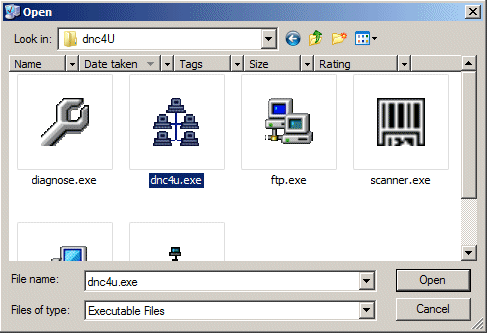
6. dnc4U will be added to the list, make sure you tick
the box next to it.

7. Click the OK button for changes to take effect.
|


